
All work

Quanta

Seven workspaces for one assistant — a window where the tools live next to the conversation.

macOS says “damaged”? Install notes

Design & build · xyc design 2026 macOS · Windows Electron · Python · DeepSeek v2.0.0

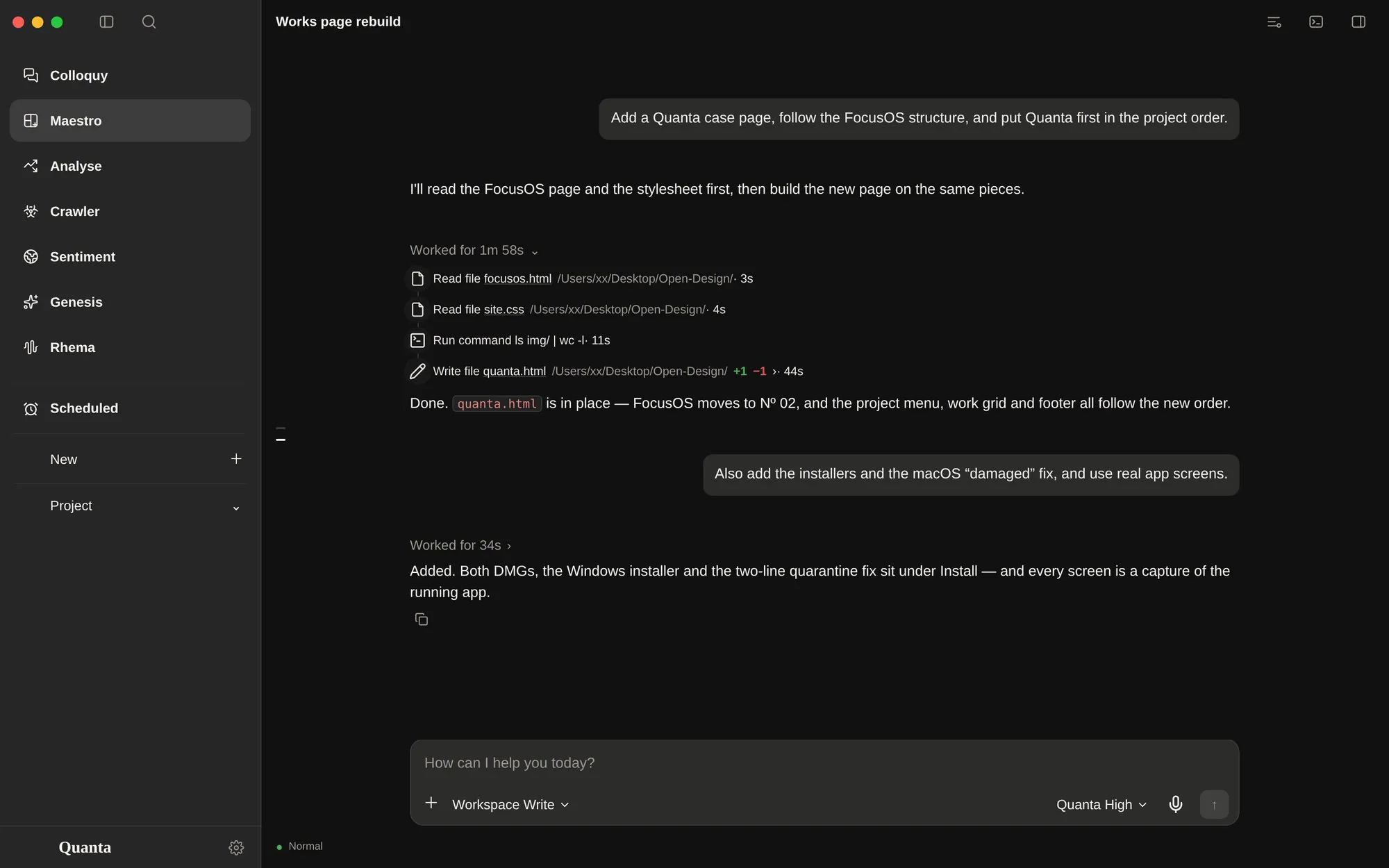
Quanta, Maestro page: a finished turn with its work steps, a diff and the composer
Overview

Seven workspaces, one window.

Quanta started with a simple complaint: the assistant lived in one window and the work lived in six others. A chat here, a crawler there, a chart in another app, a browser tab for the one site it could not open.

So the app is split into seven pages instead of one long thread. Each page has its own assistant, its own model group and its own project ledger — and they all sit on the same window, the same terminal, the same working folder and the same memory.

Two more pages sit beside them: Scheduled, where recurring work is queued, and Settings, where eleven panes of machinery can be inspected.

“Every page is a room. The building is one.” Working note, 2026
Pages

Every page, and what it is for.

Nine views, one per job. Every screen below is a capture of the running app — the same renderer that ships in the build.

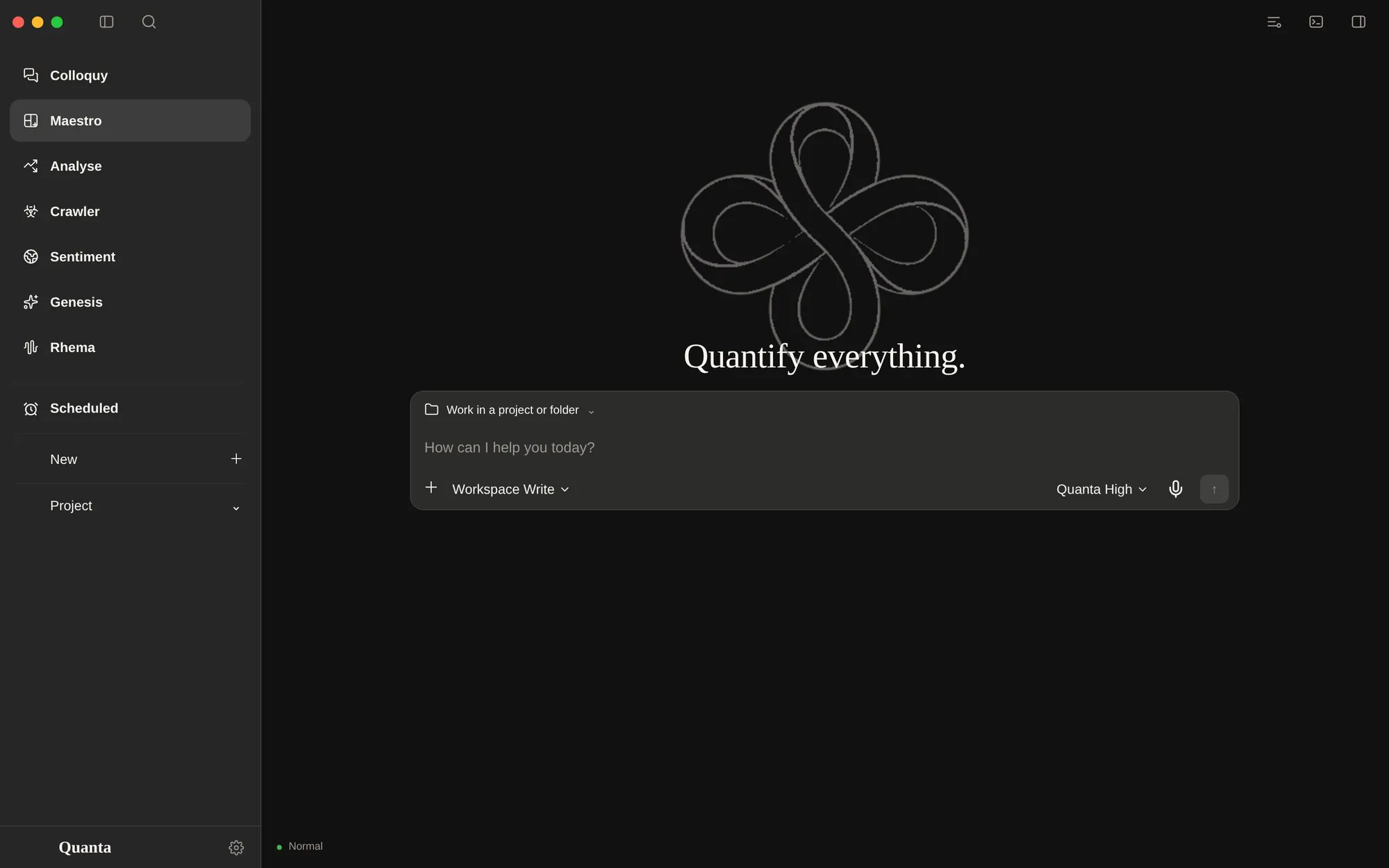
Quanta Maestro page, empty project: the knot watermark, “Quantify everything.” and the composer
01Quanta Nova

Maestro

The default page, and the one that does the actual work: a full-width assistant that reads and writes files, runs shell commands and writes code — with every move shown in the turn.

  • Files, shells, codeReads the working folder, runs a real shell, edits code. The turn records what it read, ran and changed, down to +N −M.
  • Projects that rememberEvery project owns its sessions, materials and context, and names itself after the first exchange.
  • Notifications that say somethingThe title is the session, the body is the reply. Click it and the window returns to that conversation.
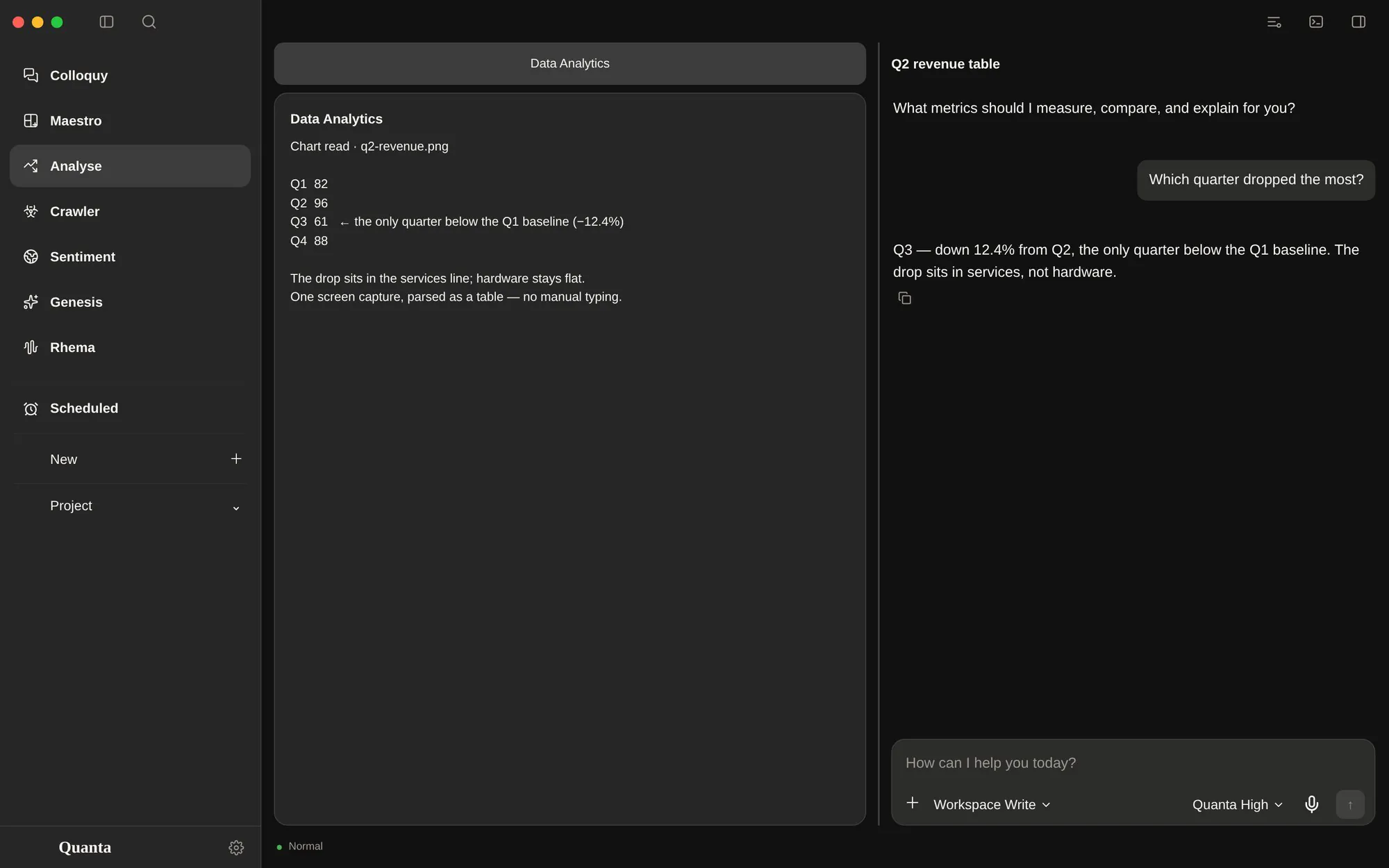
Quanta Analyse page: a chart read as a table on the left, a narrow chat answering on the right
02Quanta Metric

Analyse

A measuring bench with a narrow assistant beside it. Capture a chart, drop a spreadsheet or a photo of a problem set; Quanta reads it, then answers on the right.

  • Figures read as dataCharts and tables are parsed as numbers; when the image is a test paper, it answers question by question.
  • Any file, one contextPDF, Word, Excel, CSV, code and images are extracted into the shared context of the page.
  • Materials, not prompt stuffingThe assistant sees an index first and fetches a full document only through list_artifacts and read_artifact.
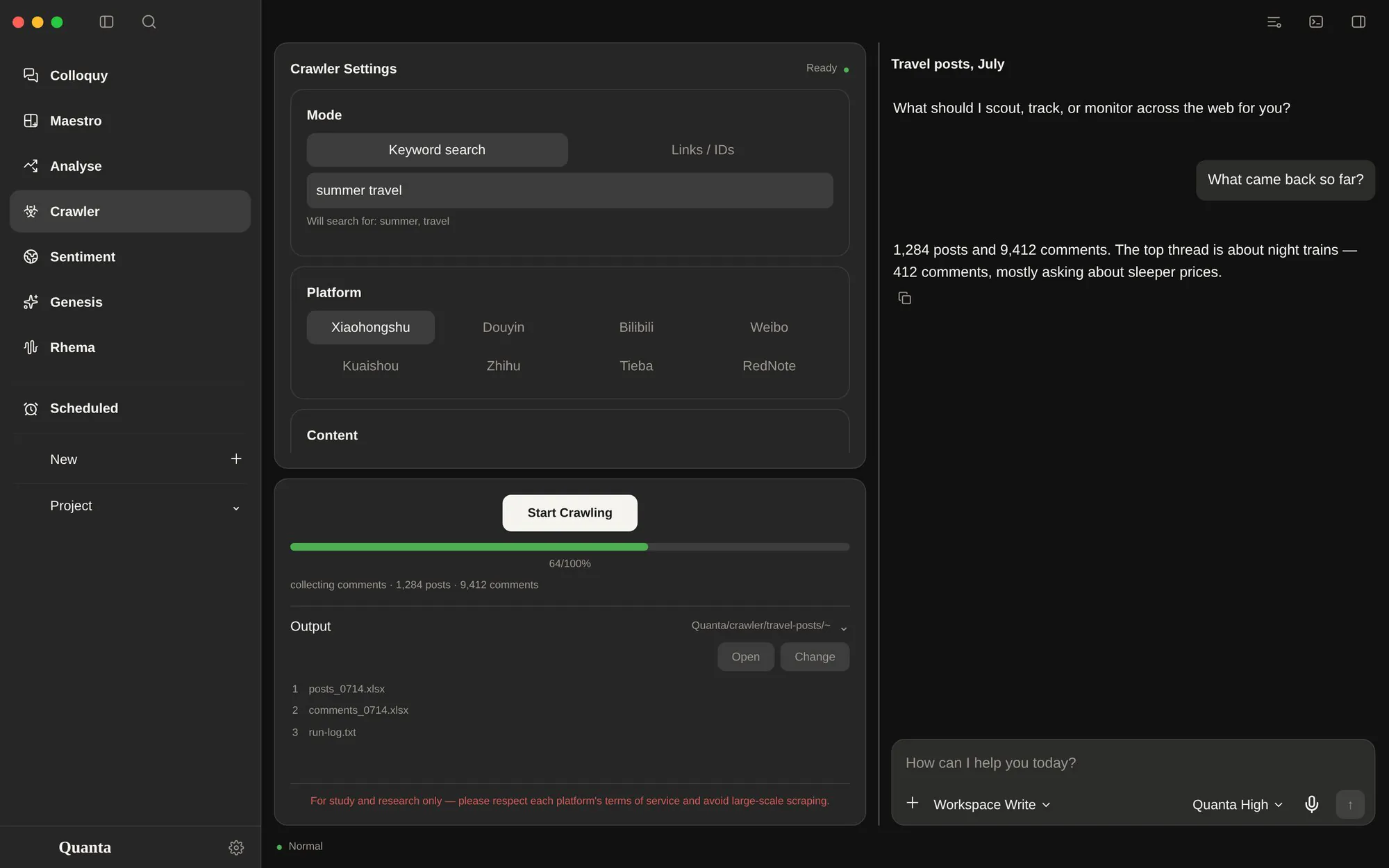
Quanta Crawler page: crawler settings, a run in progress and the output list beside a chat
03Quanta Scout

Crawler

Scout sets a crawl up like a lab protocol — platform, term, how many posts, whether to reuse the login — then reports progress and drops the results into the project folder.

  • MediaCrawler, left untouchedEach run copies the crawler source into the project, applies only this run's changes, and never edits the original.
  • The login survivesA symlinked browser profile outside the copy keeps the account signed in between runs.
  • Ask the results directlyThe output folder is read back as material, so “which posts drew the most comments” works in the same window.
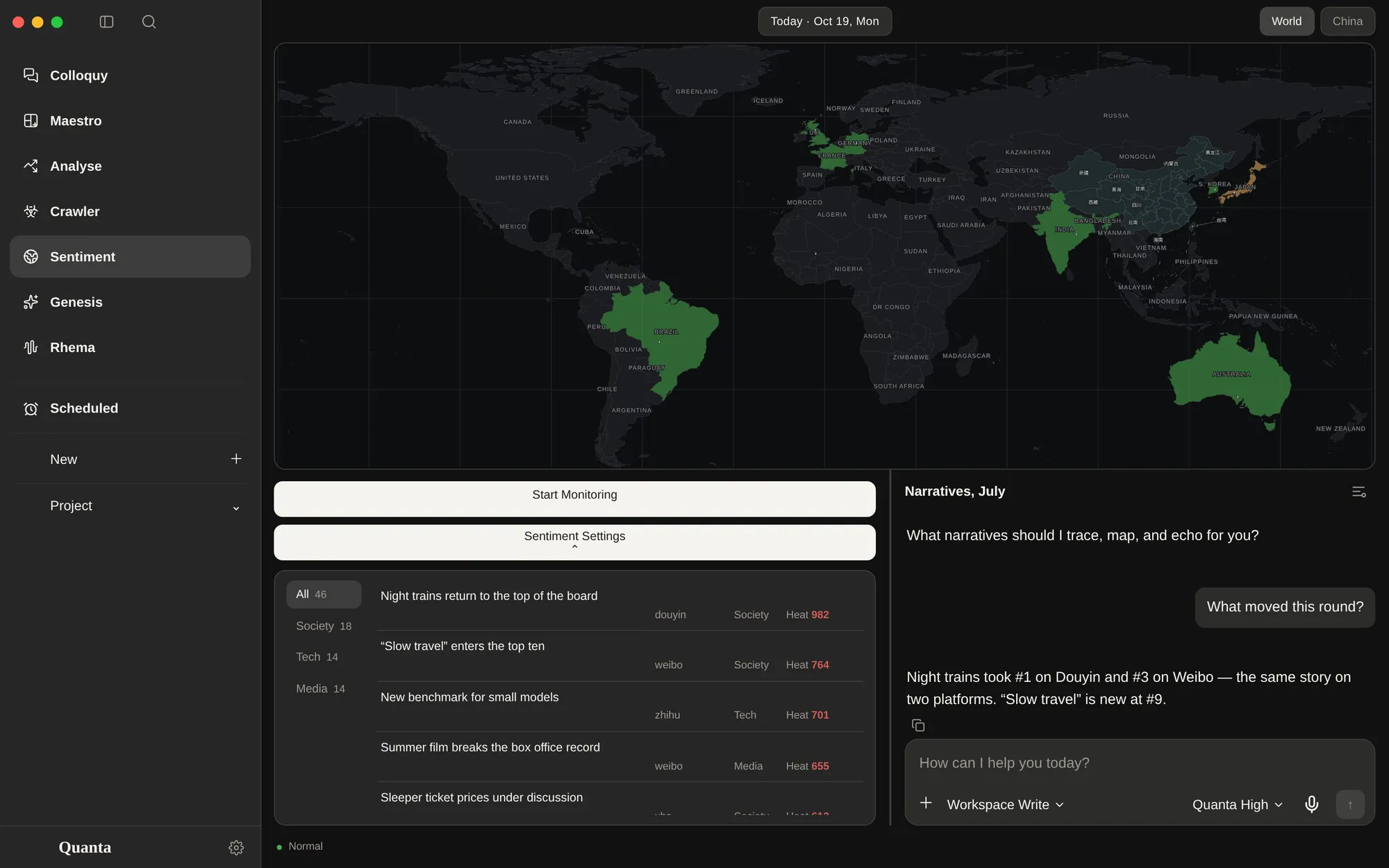
Quanta Sentiment page: a world map painted by country, a round of events and a chat explaining what moved
04Quanta Echo

Sentiment

A world board of narratives. Start Monitoring pulls one round from sixty platforms (eleven by default), merges it into today's file and pins the snapshot to the conversation.

  • One story, many platformsThe same topic is merged across platforms; rank, heat and links come from the last round that saw it.
  • A file per dayEach day accumulates rounds and drops topics that stopped appearing; the map fills by how many stories each country carries.
  • The board rides alongEvery new message carries the current snapshot, so “what changed since this morning” is answerable.
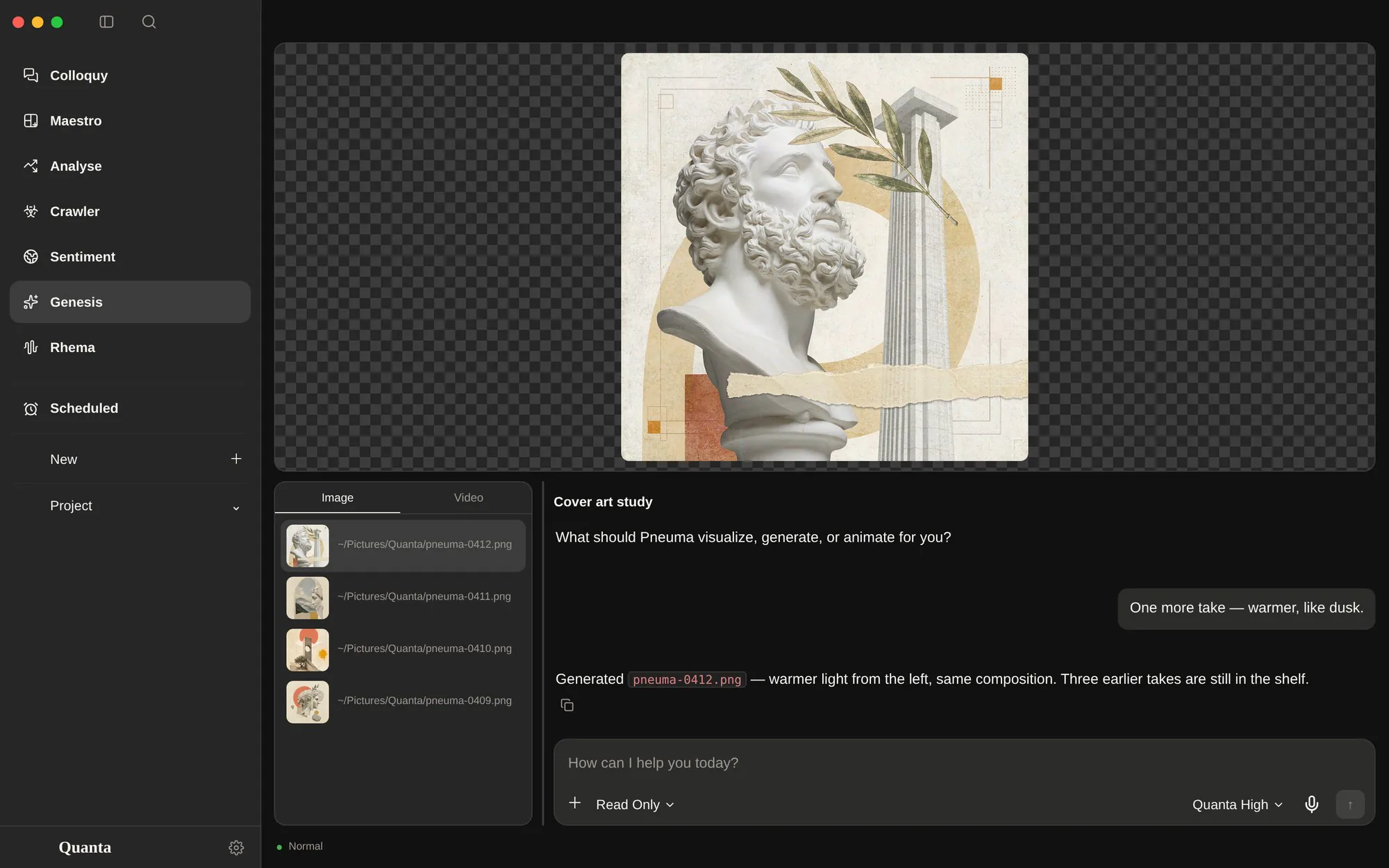
Quanta Genesis page: a generated image on the stage, the Image shelf with four results and a chat
05Quanta Pneuma

Genesis

A stage and a shelf. Pneuma makes stills and clips, keeps every result in the project folder, and plays them full-area without leaving the window.

  • Image and Video, two shelvesOne tab per kind; the stage shows the original, the grid keeps the rest one click away.
  • Progress, not a spinnerEach generation reports its stage and a bar, so a long clip never looks like a frozen window.
  • Products stay filesOutput is an ordinary file in the working folder — preview it, reveal it, drag it anywhere else.
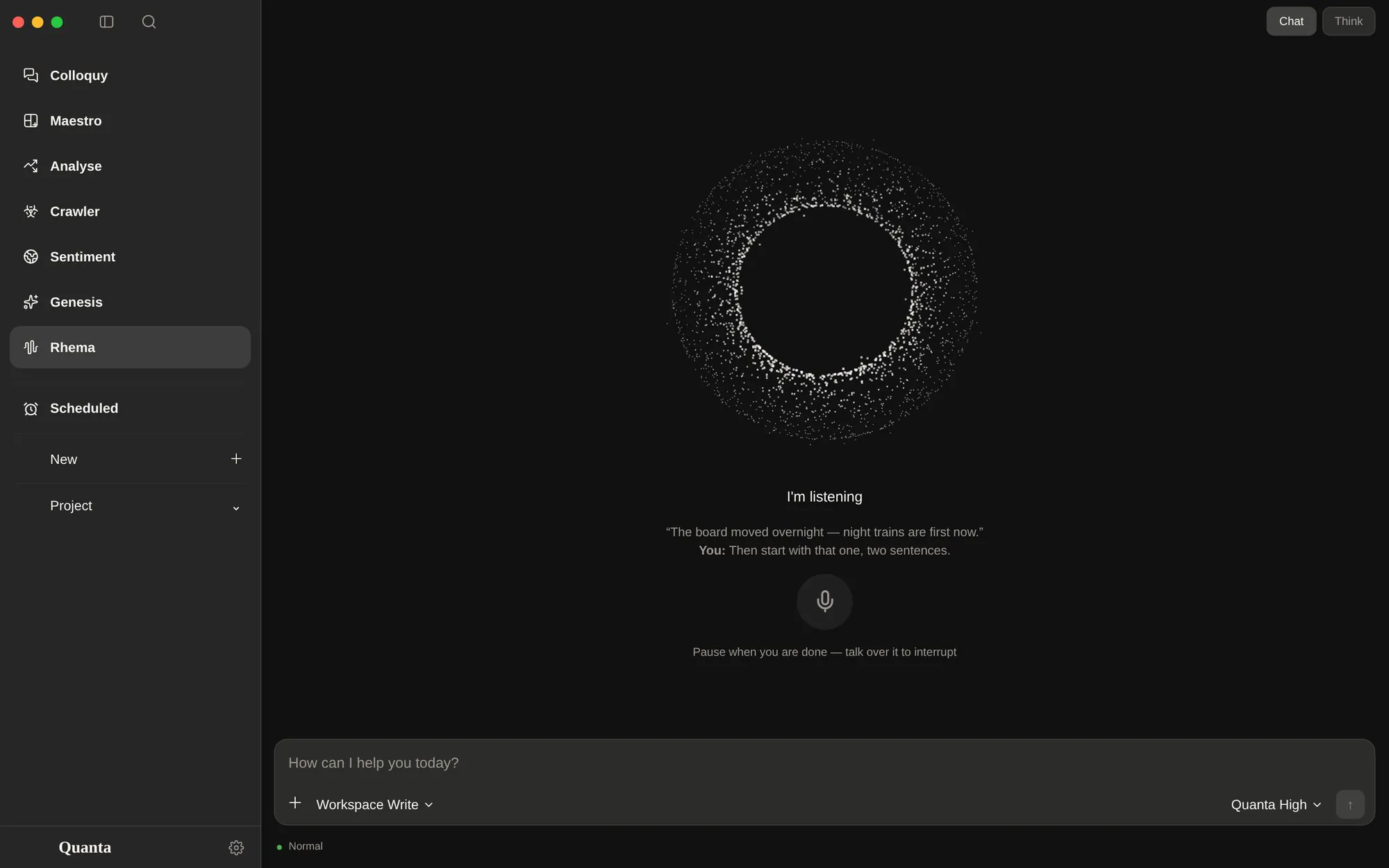
Quanta Rhema page: a particle orb, the “I’m listening” state, captions and the mic button
06Quanta Lalia

Rhema

Voice, not dictation. Press the mic, talk, stop; Lalia transcribes, answers and reads back sentence by sentence — and you can cut in before it finishes.

  • Captions while it speaksTwo lines under the orb: what it said, then what you said, so a spoken turn is still readable.
  • One session, two inputsThe same conversation can be read and typed as text — type whenever speaking is not convenient.
  • Speech from Edge voicesReplies are synthesised with Microsoft's Edge voice service and played in the window, not exported.
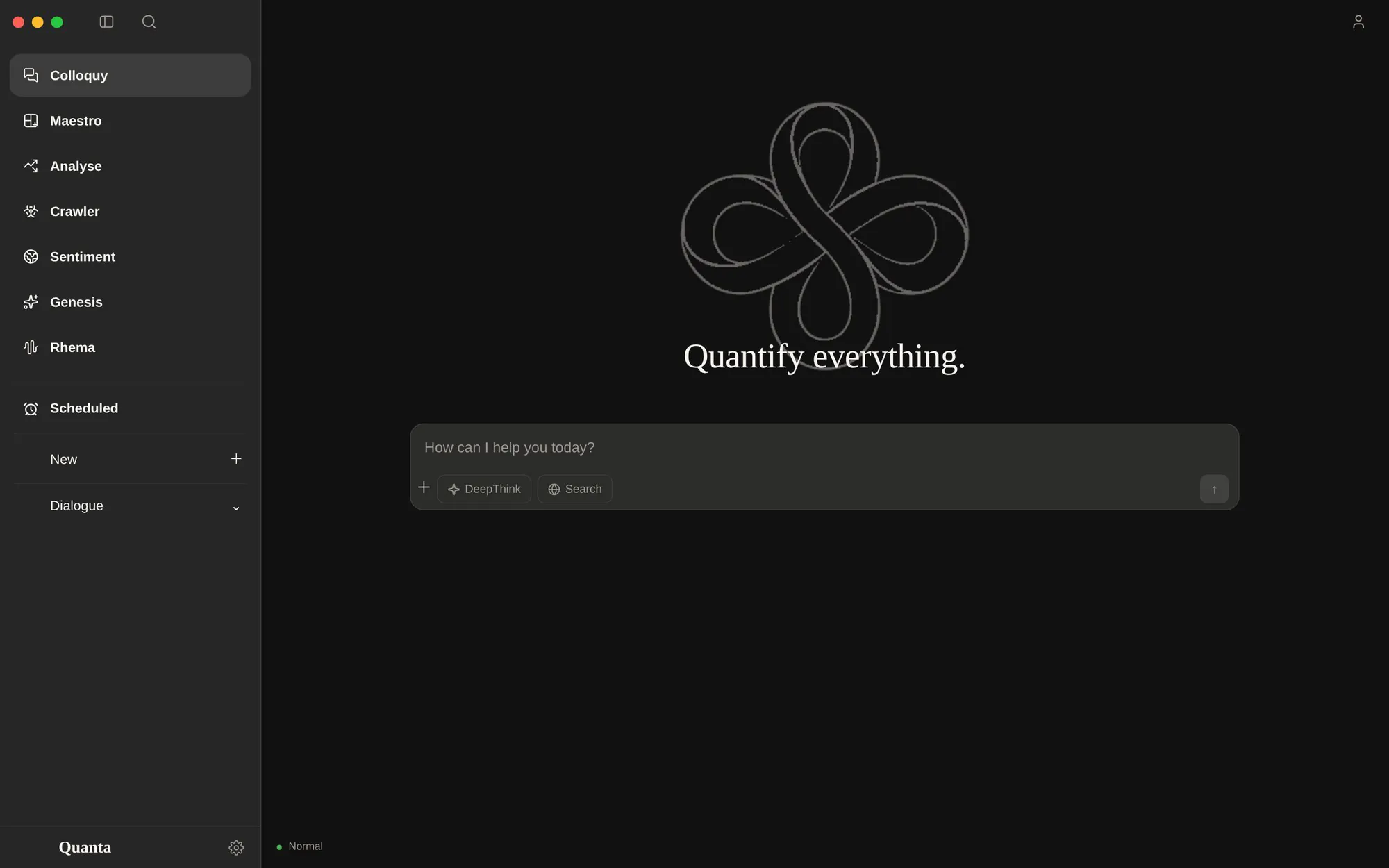
Quanta Colloquy page: the welcome state with the knot, the composer and DeepThink and Search switches
07Quanta Agora

Colloquy

DeepSeek's web chat, embedded as a real page inside the app. The wrapper adds what the web page lacks: a Quanta composer, attachments, and DeepThink and Search as switches.

  • The real site, not a cloneIt runs in a native web view, so account, history and every server-side feature are exactly DeepSeek's.
  • One composerType in the app, not in the page; DeepThink and Search become chips on the same card.
  • Attachments mirroredFiles dropped into Quanta are pushed into the web input, and the chips stay behind as the receipt.
Also in the app

Somewhere to queue work, and somewhere to look inside.

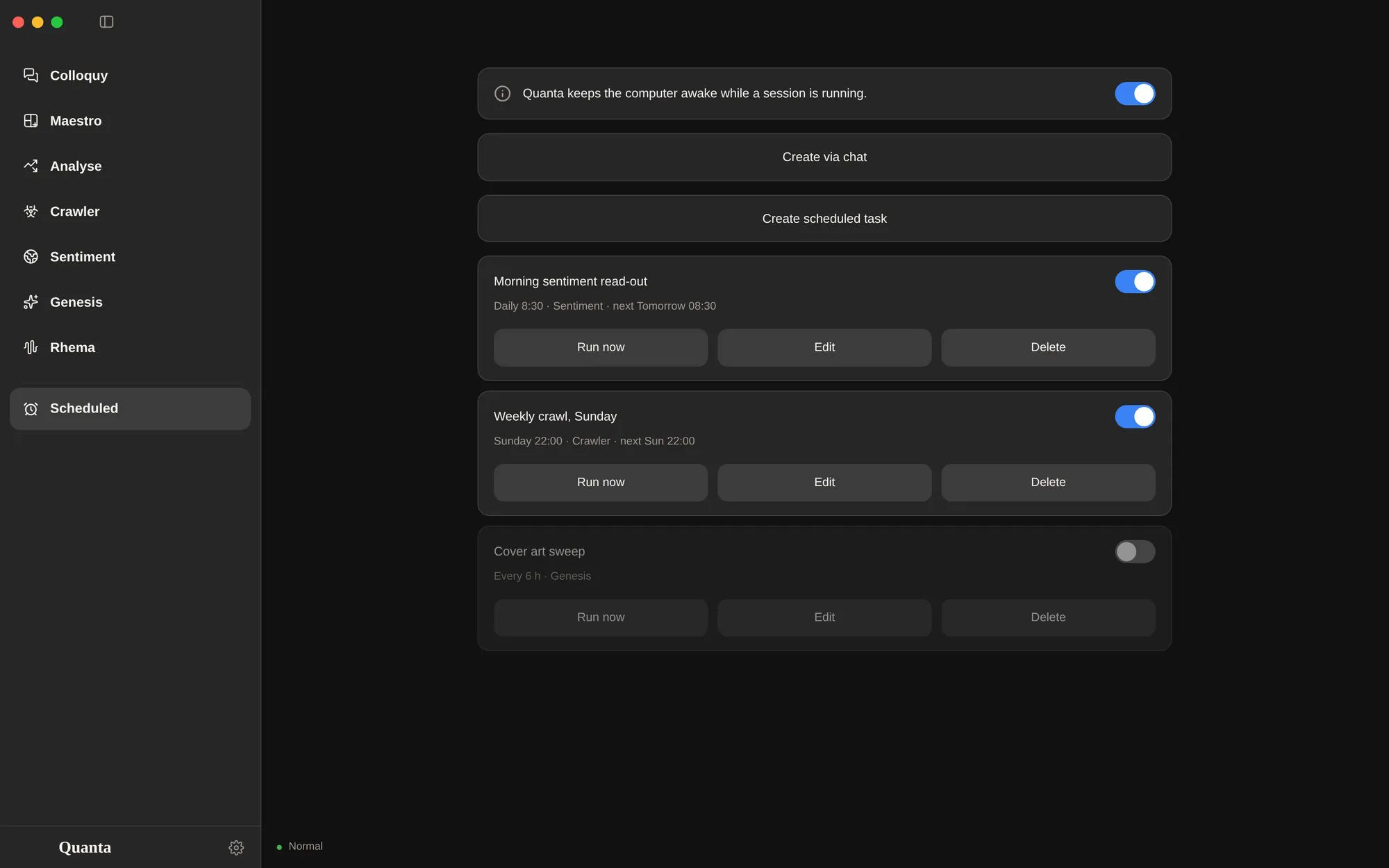
Quanta Scheduled page: keep-awake switch, create buttons and three queued tasks
08Every hour, every Sunday

Scheduled

Interval, daily, weekdays or weekly — created from a menu or simply by asking in any page's chat. Each task keeps the page and the permission level it was born with.

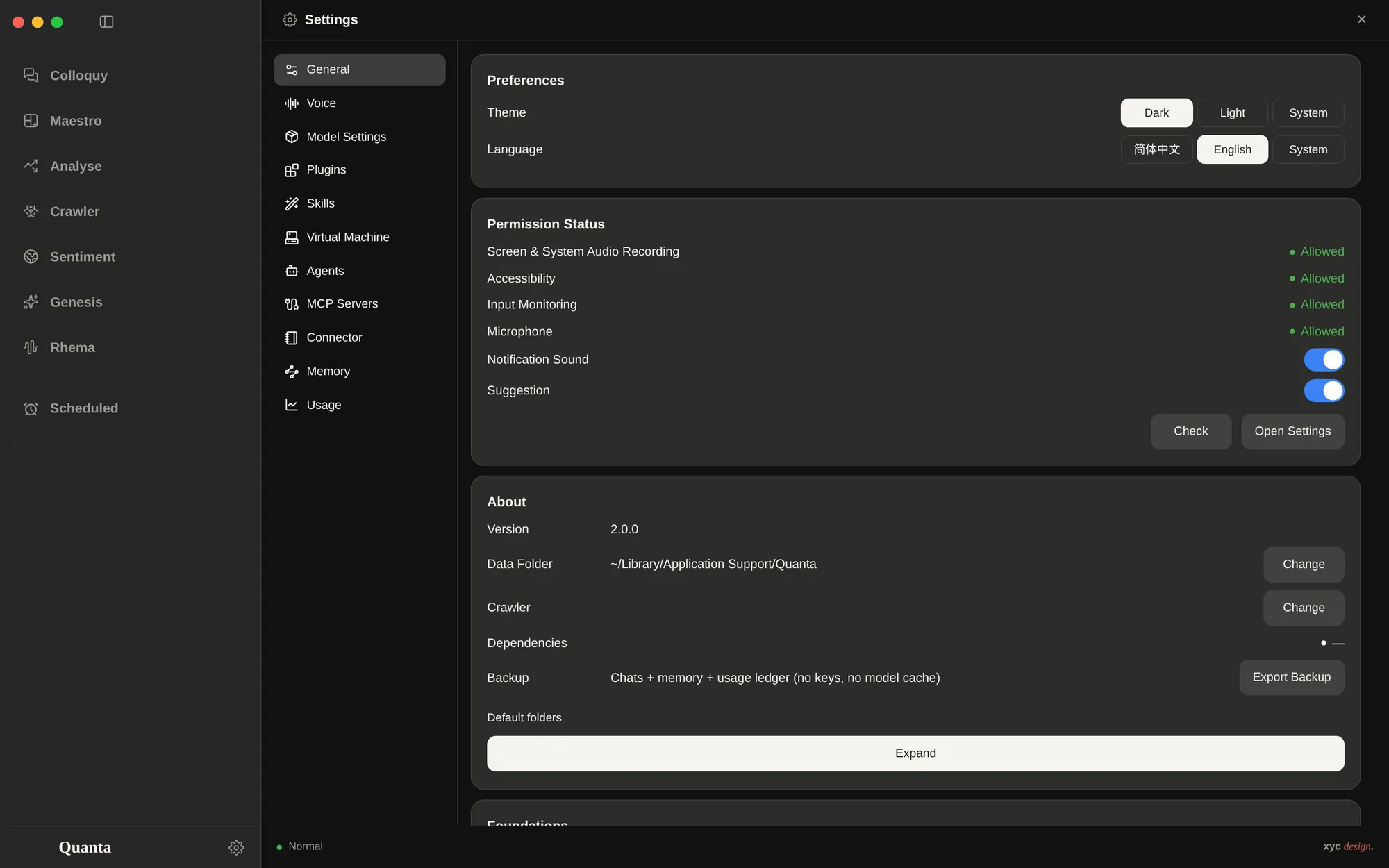
Quanta Settings: eleven panes, permissions, data folder and backup
09Eleven panes

Settings

Appearance, language and permissions; voice; model groups per page; plugins and skills; the Linux VM, subagents, MCP servers, connectors, memory and usage.

Architecture

A window in front, a workshop behind.

Electron draws the window. Python owns the work: files, a real terminal, the models, the tools and a Linux machine for the things macOS will not do.

RendererElectron
Nine pagesrail · topbar · status
Turnssay · work · summaries
Chrometerminal · sidebar · search
JSON
BridgePython
Harnesstools · memory · subagents
Workspacefiles · pty · captures
ProvidersDeepSeek · Edge voices
spawn
Sidecarsseparate
Agent homesone preset per page
MediaCrawlerown process, own env
Linux VMschedules · sandbox

No build stepThe renderer is plain HTML, CSS and JavaScript, loaded straight from disk. Edit a file, restart, see the change.

Data is filesProjects, sessions, materials, memories and generated media all live in one data directory — point it elsewhere and everything moves with you.

Three platforms, one codebaseApple silicon, Intel Macs and Windows; platform chrome is measured once and injected as CSS variables.

Memory

Memory that is a folder, not a black box.

Quanta remembers in plain Markdown — one file per memory, filed under the page it came from. You can open the folder, read every note, and put it in git.

Memory library 84 notes · 5 areas · 137 links
Inboxjust captured, not filed yet12
Rawsources kept verbatim31
Wikisummaries · concepts · indexes22
Outputsanswers · decisions · health14
Archivefaded, never deleted5
memory/Wiki/summaries/m-20261002-a1b2c3.mdupdated 2d ago
title: Prefers tables in Chinese
area: maestro          tags: [preference, tables]
links: [m-20261001-x9y8, m-20260928-k2]
source: chat           importance: 4
savesearchreadlinklistembed

Most “memory” features are a vector store behind an opaque API. Quanta's is a directory of notes with frontmatter: title, area, tags, links, source, dates — and the body is just prose.

  • Five areas, one per pageMaestro, Analyse, Crawler, Sentiment and Genesis each own an area; Rhema files into Maestro because it does the same kind of work.
  • Layers, not a dumpInbox → Raw → Wiki (summaries, concepts, indexes) → Outputs (answers, decisions, health) → Archive. Nothing is deleted, only faded out of the graph.
  • Recall by meaningAn on-device embedding pass indexes every note, so “that preference about tables” finds it without the exact words.
  • Tools, not prompt stuffingsave, search, read, link and list are tools the agent calls. Drag a PDF onto Settings and it is filed; the Context card counts what a turn used.
In a turnA memory step appears in the work block when the agent saves, searches or links a note.
In the Context cardThe right sidebar counts the memories this conversation actually used — no guessing.
In Settings → MemoryThe graph above, a health check, and an import target: drop a PDF, Word or Excel file and it is filed.
Agents

One assistant, a small team behind it.

When a task is big enough to split, Maestro delegates. Three named roles cover the shapes of work — find, do, check — and each one runs in its own context.

Main agent Quanta Nova keeps the plan, owns the thread, writes the answer
Retriever read-only · read / glob / grep / web finds files, facts and usages — with paths and line numbers, and says what it did not find
Executor writes · edits · runs commands carries the whole task out, verifies it, then reports what changed and what still fails
Reviewer reads the result against the ask reports problems, not praise — the cheapest way to catch a wrong turn before it ships
Subagents never see this conversation — the brief has to be self-contained. They report back, and the main thread stays one thread. tasksubagent_listrun_workflowask_claudeask_codex
01

Narrow tools by role

The retriever cannot write, the executor is not asked to judge, the reviewer is not asked to fix. A role is a tool allow-list, not a job title.

02

Isolated contexts

A delegate starts with a brief, not with your whole history. No context bleed, no half-remembered instructions, no token bill for a conversation it does not need.

03

Parallel, and visible

Several delegates can run at once; each one appears as a card inside the turn, and the Context card lists the subagents this conversation actually used.

04

A second opinion, on demand

ask_claude, ask_codex and ask_deepseek are ordinary tools — a page can consult another model without leaving the app or copying text between windows.

Craft

One red, seven voices.

The window stays quiet so the work can be loud: one accent colour, one serif for the welcome phrase, and a different assistant name on every page.

Colour · dark chromestyle.css

#111111
#191919
#1f1f1f
#2f2f2f
#e05252
#30d158
#2fb8a8
#ecebe6

Seven assistantsconfig.PAGE_GROUPS

Quanta NovaMaestro
Quanta MetricAnalyse
Quanta ScoutCrawler
Quanta EchoSentiment
Quanta PneumaGenesis
Quanta LaliaRhema
Quanta AgoraColloquy
Install

Getting it open, first time.

The builds are not notarised. macOS needs one Terminal command; Windows needs one click through SmartScreen.

If macOS says it is damaged

Gatekeeper blocks unsigned builds from outside the App Store. Drag Quanta into Applications, then run these two lines in Terminal — once is enough.

Only removes the quarantine flag from this app on this machine. On Windows, choose “More info” → “Run anyway”.
$ xattr -dr com.apple.quarantine /Applications/Quanta.app
$ open /Applications/Quanta.app
Nº 02 · FocusOS

Next: a timer with nothing to prove.